Showing posts with label Amazing Tech. Show all posts

Friday, December 4, 2009

Google Wave Features


A wave can be both a discussion and a document where people can discuss and work together using richly formatted text, photos, videos, maps. Wave builds on the concept of cloud computing.
Google wave is going to become a wave of the future. It is a next generation web-based communication and collaboration tool.
Google wave can merges service e-mail, instant messaging, wikis, and social networking together at one single platform.
Common terms which are used in Wave are Wavelet, Blip, Document, Extension, Gadgets, Robots
Key features of Wave:
• Real-Time information
• Live transmission of any type
• Used as faster conversation
• Wave is used as new way of creating dialogue among group of users
• Google Wave contains gadgets and tools
• In Google wave there are gadgets like Wikify which can brings Wikipedia to your Google Wave account.
• It include tools for checking spelling and grammar
• It has a great futures like translating between 40 different languages by using Rosy Extension.
• It has TWaves extension that allows the user to incorporate their tweet stream.
• It has drag and drop sharing of digital assets like photos, sound and video.
• Playback facility
• Open Source
• Easy embedding facility
• eBayBot - Search eBay in Google Wave
• Google Wave has a Public Timeline, like Twitter ( “with:public” )
• Webcam Video Chat and Much More on Google Wave with 6rounds
• Adding new people to the conversation easy
• Used as customer support tool for marketers
• Bloggy extension can Embeds the Wave into a blog
• Polly the Pollster : Creates any poll you can imagine
Google Wave is going to become project management tool for the future.
No doubt Google wave is going to become a future marketing tool. Marketers will have the ability to create customer support in real time.
It is also becoming developer heaven for developing gadgets and extensions and Google has announced that there will be an official Wave app store.
According to experts research Google Wave is a best to organize role playing games in the coming future.
Wave is going to become a real-time marketing strategy for the marketers.
READ MORE - Google Wave Features

Google Wave First Look


If you're not one of the 100,000 lucky users who gets an invitation to Google Wave today, don't fret. You can check out Google Wave right here.
But first, ground rules. Click on all images in this post to see them full size. Uppercase "Wave" refers to the entire Google Wave product. Lowercase "wave" refers to an individual message or document. Think of a lowercase wave like an email or a Google Doc that you're collaborating on with other people. The screenshots in this post are from the Wave developer preview, not wave.google.com, invites to which are going out today. We'll update this post with anything significantly new in the non-preview version when we get our grubby little paws on the proper server invitation.
Here is a simple video i took from YouTube to present Google Wave's nice features
Ready? Let's go.

READ MORE - Google Wave First Look

Sunday, July 26, 2009

Google Latitude now available for iPhone—via the web


Google has finally released a version of its Latitude geo-location service for the iPhone. However, Apple forced encouraged Google to abandon its native iPhone app, citing possible confusion with the default Maps app. Even though Google was able to develop a nice looking web-app alternative, the result leaves much to be desired.

The basic gist of Latitude is similar in some respects to BrightKite—fire up the app and it sends your GPS coordinates to Google. It also lets you view a map showing the coordinates of all your friends, wherever they might be located. If you're trying to meet up with friends on a Friday night, for instance, it makes finding them much easier. Like BrightKite, users can control who can see the location information and just how accurate it is—helpful for avoiding awkward confrontations with that stalker-y blind date from last week.

Google makes native clients for Android, Blackberry, Symbian and Windows Mobile platforms, but Apple apparently wasn't having any of that on the iPhone. "We worked closely with Apple to bring Latitude to the iPhone in a way Apple thought would be best for iPhone users," wrote Mat Balez, Product Manager with the Google Mobile Team. "After we developed a Latitude application for the iPhone, Apple requested we release Latitude as a web application in order to avoid confusion with Maps on the iPhone, which uses Google to serve maps tiles."

Luckily, Mobile Safari supports the W3C Geolocation API, and ties it in with iPhone OS's Core Location, so it makes a web-based Latitude possible. One annoying side effect, though, is that you have to keep approving Safari to use Core Location whenever you load a website using the Geolocation API. And, despite the iPhone-optimized delivery, I found the Latitude web app performance to be less than stellar. Unlike other mobile platforms, Apple also doesn't offer a way for third-party apps—and this extends to web apps—to run in the background, which prevents Latitude from updating your GPS coordinates if you fire up another app. It will continue to broadcast your location, on the other hand, as long as it is the currently active tab in Mobile Safari.

With so many limitations, though, Latitude doesn't quite achieve the set-it-and-forget-it ease that makes most such apps handy. You can use it to check and see if any friends are nearby, but if those friends are using an iPhone, you're only liable to see the location where they last remembered to load Latitude. Overall, the concept is interesting, and has the potential to be useful and fun. Ultimately, the iPhone version simply doesn't quite deliver the full Latitude experience.

READ MORE - Google Latitude now available for iPhone—via the web

Thursday, July 23, 2009

New ‘Google’ phone an impressive upgrade


Saying “T-Mobile G1” isn’t too bad, but “T-Mobile myTouch 3G with Google” is a mouthful. Once you get past the name, the phone itself is an impressive follow-up to the first Android phone that was released last fall. The “myTouch 3G” is due out Aug. 5, and after initial testing of the phone, I find it’s a winning alternative to the iPhone, BlackBerry and the Palm Pre for those aren’t enamored with those choices.

The phone betters its older sibling in looks — sleeker and lighter — and performance with better battery life. Those improvements are mainly because the myTouch is a touchscreen-only phone; the G1 is touchscreen but also includes a slide-out QWERTY keyboard, which adds weight and drains energy, T-Mobile says. The myTouch weighs 4.1 ounces and has a rated talk-time battery life of up to six hours; the G1 is a heftier 5.6 ounces with a rated battery life of up to five hours, although it often didn’t last that long.

Battery life is a big issue with smartphones, with Wi-Fi and GPS radio use, Web surfing and downloads and e-mail all draining the power. T-Mobile says the battery in the myTouch is physically larger than the G1’s and also has better radio performance and power management, in large part because it doesn’t have a physical keyboard.

After eight hours of running the myTouch, including a few hours on standby, the battery meter said it was at 52 percent; and after 12 hours, it was at 29 percent. That said, I was running the phone through different paces, sometimes using Wi-Fi, which drains the battery more quickly, because I could not get 3G, or faster wireless, network service in my area.

The phone’s 3.2-inch display is the same size as the G1’s and both phones, made by HTC, use the same Qualcomm 528-MHz processor. The myTouch is 4.45 inches high, 2.19 inches wide and .58 of an inch thick, compared to its predecessor, which is 4.6 inches high, 2.1 inches wide and .62 of an inch thick. It feels good in hand, just the right size, and is narrower than the iPhone, which is 2.4 inches wide.

The myTouch comes with 512 megabytes of internal memory, double the internal memory of the G1, and a pre-installed 4GB removable microSD card.

Less bulk is definitely welcome. But the sleeker profile comes with some tradeoffs. The seven buttons, including a trackball, on the front of the device feel a little crowded and too close together for comfort, unlike the buttons on the G1.

The myTouch's on-screen menus also can be a little dicey, especially when dealing with e-mail. It's a little too easy to hit the wrong key. On-screen buttons for "reply," "reply all" and "delete" are positioned at the bottom of the screen close to the hardware buttons.

The "delete" button in particular is near the physical "back" button, and several times I thought I hit that button, but found I had inadvertently hit "delete," and away went my e-mail.

The touchscreen itself is very responsive, and as with the G1, users touch, tap, swipe and scroll, and have use of on-screen menus, as well as a trackball to navigate. The accelerometer, the motion sensor that switches the screen from portrait to landscape mode, is also quite nimble.

READ MORE - New ‘Google’ phone an impressive upgrade

BlackBerry Desktop coming to the Mac


At long last, Research In Motion is bringing its BlackBerry Desktop software to Mac OS X.

In a blog post on Monday, RIM announced that a version of its smartphones' desktop software will be released this September for Apple computers.

According to the smartphone maker, users will be able to sync their iTunes playlists, calendars, contacts, notes, and tasks from their Mac. They will also have the option of adding applications, updating the BlackBerry when new software is made available, and managing multiple handsets on their Apple computers.

Although users will be excited to know BlackBerry software is finally coming to their Mac, some of those users might not be satisfied. RIM said only Mac OS X versions 10.5.5 and up will be supported, meaning that Mac users who haven't updated Leopard or those running Mac OS X 10.4 Tiger likely won't be able to run the software.

Unlike iPhone software, which can be installed in both Windows PCs and Macs, RIM's BlackBerry software has been available only for Windows; a third-party tool has been required to enable communication between Macs and BlackBerrys.

If you want to be notified when the software is available when it's released in September, you'll need to sign up on RIM's Mac page.


READ MORE - BlackBerry Desktop coming to the Mac

Wednesday, July 22, 2009

Synaptics ClearPad 3000 Touchscreen


Synaptics has shown of their latest touchscreen technology, the Synaptics ClearPad 3000 Touchscreen. The Synaptics ClearPad 3000 Touchscreen can register up to 10 fingers simultaneously, it is designed to be used in high end mobile phones like the iPhone, as well as hand held gaming consoles.

The Synaptics ClearPad 3000 Touchscreen has 48 sensing channels which means it can pick up 10 fingers at once, and apparently the technology will scale up to 8 inch screens.

It certainly looks very impressive from the video, hopefully we will see it in mobile phones next year and who know we many even see it in the next generation iPhone.

READ MORE - Synaptics ClearPad 3000 Touchscreen

E-Readers: The End of Bookstores?


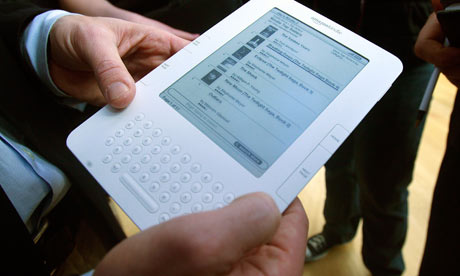
I don't buy books anymore. That is I don't buy hard copies of books anymore. I've been an eReader user for more than three years. It started with the Sony eReader and then moved to the Kindle (both I and II). At first, my transition to digital book consumption was gradual. I'd often be reading (and buying) hard copy books at the same time I was getting used to the experience of the digital platforms.

Six months ago, I cut the cord for good. I love my Kindle. As many who have embraced digital eReaders have reported, I quickly found myself reading more than I ever have in my life. Other than the pain of having to shut down during takeoff and landing periods in flight (at some point that has to be solved), I have not looked back.

One of the curious byproducts of my new book consumption behavior is that I actually am spending more time than I ever have before in bookstores. Wait a minute, you might say, if you are reading and buying digital books, why would you be doing that?

Reading is a momentum-based activity. The more you do it, the more your want to do it. I am constantly seeking my next read. While there are many great places online to read about new books, there is nothing that can capture or replicate the exploring wonders of a good book store. That is, if you don't know what you are searching for, the digital medium can fall short in comparison to the retail experience.

A good bookstore brings an incredible wealth of inventory to bear. The ability to "sample" in person is far better than in digital format. Great bookstores are also strong gathering points for discussion and guidance from experts and actual authors.

Here's the problem. The culmination of my bookstore experience is the process of taking my Kindle out and downloading the book(s) I've discovered through the wonders of the retail experience. That's financial ruin for the bookstore.

I wonder how common that experience is. If it's as frequent as I believe, Amazon is getting one of the great free rides on the back of Border's, Barnes & Noble, and all of the wonderful independent bookshops that help people find the right books. Think about it, the bookstore helps the consumer decide which book he wants, but the transaction goes to Amazon.


Perhaps the bookstore needs to embrace the inevitable reality that its model as it exists now is not sustainable. For one thing, bookstores could devise an on-site customer digital download path where the store can extract a negotiated fee for all sales it drives to Amazon. I certainly would do what I could to help the store get credit (and payment) for the service they provided me.

One thing's for sure: I don't ever want to go back to reading and buying hard copy books. I also don't want to give up the benefit of the bookstore retail experience in helping me find what to read next. It's all yet another example of the rapid disruption brought on by the digital revolution. However, it's also an opportunity to rethink and evolve long-standing models into those that can thrive into the future.

READ MORE - E-Readers: The End of Bookstores?

Monday, July 13, 2009

Smart Clothes Could Take Photos

Clothes could one day take snaps of everything happening around whoever is wearing them.

US researchers have made smart fabric that can detect the wavelength and direction of light falling on it.

The research team has found a way to accurately place sensors in each fibre and co-ordinate the electrical signals they send when light falls on them.

The results were a step towards "ambient light imaging fabrics" said the researchers.

Led by Dr Yoel Fink from the Massachusetts Institute of Technology, the researchers have extended earlier work that placed sensors in relatively large polymer fibres.

Dr Fink and colleagues found a way to stretch the 25mm strands of polymer into much thinner fibres while maintaining the relative positions of the sensors.

This earlier work has led to the creation of very long and flexible light and temperature sensors that may find a role in smart fabrics for soldiers or those working in hostile environments.

In their latest work, described in a paper in Nano Letters, these thinner strands were woven into a 0.1m square section of fabric. The careful creation of the fibres and positioning of the light-sensitive elements meant that the team knew which signals were being sent by which sensors.

This enabled the team to reconstruct, albeit crudely, an image projected onto the small square of fabric. The researchers said their work was an "important step" towards finding ways to get many nanoscale devices working together.

READ MORE - Smart Clothes Could Take Photos