Thursday, July 23, 2009

New ‘Google’ phone an impressive upgrade


Saying “T-Mobile G1” isn’t too bad, but “T-Mobile myTouch 3G with Google” is a mouthful. Once you get past the name, the phone itself is an impressive follow-up to the first Android phone that was released last fall. The “myTouch 3G” is due out Aug. 5, and after initial testing of the phone, I find it’s a winning alternative to the iPhone, BlackBerry and the Palm Pre for those aren’t enamored with those choices.

The phone betters its older sibling in looks — sleeker and lighter — and performance with better battery life. Those improvements are mainly because the myTouch is a touchscreen-only phone; the G1 is touchscreen but also includes a slide-out QWERTY keyboard, which adds weight and drains energy, T-Mobile says. The myTouch weighs 4.1 ounces and has a rated talk-time battery life of up to six hours; the G1 is a heftier 5.6 ounces with a rated battery life of up to five hours, although it often didn’t last that long.

Battery life is a big issue with smartphones, with Wi-Fi and GPS radio use, Web surfing and downloads and e-mail all draining the power. T-Mobile says the battery in the myTouch is physically larger than the G1’s and also has better radio performance and power management, in large part because it doesn’t have a physical keyboard.

After eight hours of running the myTouch, including a few hours on standby, the battery meter said it was at 52 percent; and after 12 hours, it was at 29 percent. That said, I was running the phone through different paces, sometimes using Wi-Fi, which drains the battery more quickly, because I could not get 3G, or faster wireless, network service in my area.

The phone’s 3.2-inch display is the same size as the G1’s and both phones, made by HTC, use the same Qualcomm 528-MHz processor. The myTouch is 4.45 inches high, 2.19 inches wide and .58 of an inch thick, compared to its predecessor, which is 4.6 inches high, 2.1 inches wide and .62 of an inch thick. It feels good in hand, just the right size, and is narrower than the iPhone, which is 2.4 inches wide.

The myTouch comes with 512 megabytes of internal memory, double the internal memory of the G1, and a pre-installed 4GB removable microSD card.

Less bulk is definitely welcome. But the sleeker profile comes with some tradeoffs. The seven buttons, including a trackball, on the front of the device feel a little crowded and too close together for comfort, unlike the buttons on the G1.

The myTouch's on-screen menus also can be a little dicey, especially when dealing with e-mail. It's a little too easy to hit the wrong key. On-screen buttons for "reply," "reply all" and "delete" are positioned at the bottom of the screen close to the hardware buttons.

The "delete" button in particular is near the physical "back" button, and several times I thought I hit that button, but found I had inadvertently hit "delete," and away went my e-mail.

The touchscreen itself is very responsive, and as with the G1, users touch, tap, swipe and scroll, and have use of on-screen menus, as well as a trackball to navigate. The accelerometer, the motion sensor that switches the screen from portrait to landscape mode, is also quite nimble.

READ MORE - New ‘Google’ phone an impressive upgrade

BlackBerry Desktop coming to the Mac


At long last, Research In Motion is bringing its BlackBerry Desktop software to Mac OS X.

In a blog post on Monday, RIM announced that a version of its smartphones' desktop software will be released this September for Apple computers.

According to the smartphone maker, users will be able to sync their iTunes playlists, calendars, contacts, notes, and tasks from their Mac. They will also have the option of adding applications, updating the BlackBerry when new software is made available, and managing multiple handsets on their Apple computers.

Although users will be excited to know BlackBerry software is finally coming to their Mac, some of those users might not be satisfied. RIM said only Mac OS X versions 10.5.5 and up will be supported, meaning that Mac users who haven't updated Leopard or those running Mac OS X 10.4 Tiger likely won't be able to run the software.

Unlike iPhone software, which can be installed in both Windows PCs and Macs, RIM's BlackBerry software has been available only for Windows; a third-party tool has been required to enable communication between Macs and BlackBerrys.

If you want to be notified when the software is available when it's released in September, you'll need to sign up on RIM's Mac page.


READ MORE - BlackBerry Desktop coming to the Mac

Wednesday, July 22, 2009

Synaptics ClearPad 3000 Touchscreen


Synaptics has shown of their latest touchscreen technology, the Synaptics ClearPad 3000 Touchscreen. The Synaptics ClearPad 3000 Touchscreen can register up to 10 fingers simultaneously, it is designed to be used in high end mobile phones like the iPhone, as well as hand held gaming consoles.

The Synaptics ClearPad 3000 Touchscreen has 48 sensing channels which means it can pick up 10 fingers at once, and apparently the technology will scale up to 8 inch screens.

It certainly looks very impressive from the video, hopefully we will see it in mobile phones next year and who know we many even see it in the next generation iPhone.

READ MORE - Synaptics ClearPad 3000 Touchscreen

E-Readers: The End of Bookstores?


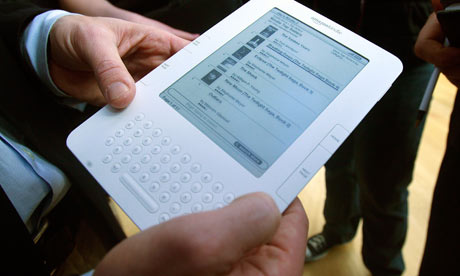
I don't buy books anymore. That is I don't buy hard copies of books anymore. I've been an eReader user for more than three years. It started with the Sony eReader and then moved to the Kindle (both I and II). At first, my transition to digital book consumption was gradual. I'd often be reading (and buying) hard copy books at the same time I was getting used to the experience of the digital platforms.

Six months ago, I cut the cord for good. I love my Kindle. As many who have embraced digital eReaders have reported, I quickly found myself reading more than I ever have in my life. Other than the pain of having to shut down during takeoff and landing periods in flight (at some point that has to be solved), I have not looked back.

One of the curious byproducts of my new book consumption behavior is that I actually am spending more time than I ever have before in bookstores. Wait a minute, you might say, if you are reading and buying digital books, why would you be doing that?

Reading is a momentum-based activity. The more you do it, the more your want to do it. I am constantly seeking my next read. While there are many great places online to read about new books, there is nothing that can capture or replicate the exploring wonders of a good book store. That is, if you don't know what you are searching for, the digital medium can fall short in comparison to the retail experience.

A good bookstore brings an incredible wealth of inventory to bear. The ability to "sample" in person is far better than in digital format. Great bookstores are also strong gathering points for discussion and guidance from experts and actual authors.

Here's the problem. The culmination of my bookstore experience is the process of taking my Kindle out and downloading the book(s) I've discovered through the wonders of the retail experience. That's financial ruin for the bookstore.

I wonder how common that experience is. If it's as frequent as I believe, Amazon is getting one of the great free rides on the back of Border's, Barnes & Noble, and all of the wonderful independent bookshops that help people find the right books. Think about it, the bookstore helps the consumer decide which book he wants, but the transaction goes to Amazon.


Perhaps the bookstore needs to embrace the inevitable reality that its model as it exists now is not sustainable. For one thing, bookstores could devise an on-site customer digital download path where the store can extract a negotiated fee for all sales it drives to Amazon. I certainly would do what I could to help the store get credit (and payment) for the service they provided me.

One thing's for sure: I don't ever want to go back to reading and buying hard copy books. I also don't want to give up the benefit of the bookstore retail experience in helping me find what to read next. It's all yet another example of the rapid disruption brought on by the digital revolution. However, it's also an opportunity to rethink and evolve long-standing models into those that can thrive into the future.

READ MORE - E-Readers: The End of Bookstores?

Sunday, July 19, 2009

Firefox improves, but still loses its edge

The war of the Web browsers has taken another turn with the release of a major new version of Mozilla Firefox, the No. 2 browser in market share, but No. 1 in the hearts of many of the most knowledgeable computer users.

This new edition of Firefox is the third big new browser release this year, following new editions of Microsoft's Internet Explorer and Apple's Safari. Unlike Firefox, these two browsers come bundled with the two major computer platforms, Windows and Mac. By contrast, Mozilla must convince users to download Firefox, which comes in essentially identical versions for both systems. And it has done a reasonably good job, garnering by most estimates around 23 percent market share, versus between 60 percent and 70 percent for IE, which is by far the leader. Meanwhile, Google — a former Firefox supporter — has joined the battle with its nascent Chrome browser, which so far runs only on Windows, but is due on the Mac one day and is to morph into a whole new operating system next year. And there are other very capable browsers with small user bases, the most notable of which is Opera.

I've been using Firefox since its inception years ago, and have been testing this latest iteration, version 3.5, since it emerged June 30. I can continue to recommend it as a fine way to surf the Web. The new version is improved, and worked very well for me on both my Windows and Macintosh computers.

But, in this round of the war, Mozilla's product no longer stands out as clearly superior, for two reasons. First, Firefox has lost its traditionally biggest advantage: greater speed than its rivals. While Firefox 3.5 is about twice as fast as the previous version 3.0, and handily beat Internet Explorer 8 in my tests, it lagged behind both Safari 4.02 and the beta edition of Chrome 2.0 a bit in most test scenarios. Overall, Safari was fastest in most of my tests, both on Mac and Windows (yes, Apple makes a little-known version of Safari for Windows).

In fact, Mozilla no longer is claiming to be the fastest browser. It now prefers to say it is one of what it calls the "modern" browsers, along with Safari and Chrome, whose under-the-hood technologies make them better at handling a growing breed of sophisticated Internet-based applications that mimic traditional computer programs like photo editors and word processors and spreadsheets.

Second, this version of Firefox has relatively few new features, and some of them are merely catch-ups to those introduced earlier by Microsoft and Apple. Most notable among these is a private browsing mode, first popularized in Safari, and greatly expanded in IE, which allows you to traverse Web sites without leaving traces on your computer to show what you've been doing.

Mozilla says its main goal from now on will be to turn Firefox into the ideal platform for running Web-based applications. It shares the belief, also fervently embraced by Google, that consumers will gradually migrate away from programs stored on their computers' hard disks to those stored in "the Cloud," the industry's term for the servers that run the Internet.

To show this, the new Firefox can do a few new tricks, like streaming video directly from Web pages without requiring plug-ins like Adobe's Flash. Alas, this works only with obscure video formats little used on the Web at the moment.

Firefox 3.5 does include some new features, in addition to private browsing.

It can pinpoint your location, so that any properly configured Web site can serve up locally relevant content. It has a nice option that lets you "forget" any Web page in your history, wiping out all traces you've been there, even if you neglected

to turn on private browsing mode beforehand. And it can recover your open tabs after a crash.

Also, Firefox continues to lead its rivals in the number and variety of third-party add-ons that enhance browsing in myriad ways, such as adding features to sites like Twitter or making bookmarking easier.

As for speed, I tested Firefox 3.5 against its main rivals by timing how long it took to launch into the same home page, and how long it took to completely load popular Web sites like Facebook and YouTube. I tested how long it took to completely load folders containing numerous sports and news sites simultaneously. I also ran an industry benchmark test that measures the browsers' speed at handling an important Web language called JavaScript. I did these tests on the same home network on both a Dell and an Apple computer.

While Firefox won a few of these tests, Safari and Chrome won more of them. In most cases, the speed differences weren't large, except in the case of IE, which was dramatically slower than the others. But this is the first new version of Firefox I've tested that didn't win most of the tests.

Firefox is still a great Web browser, and still much faster than its main rival, Internet Explorer. But its edge is being eroded.

Walter Mossberg writes on personal technology for the Wall Street Journal. His column runs Sundays in the Times.

READ MORE - Firefox improves, but still loses its edge

Saturday, July 18, 2009

Microsoft Window 7: Is New OS The Beginning Of XP's End?

Windows 7's Oct. 22 release will be an exciting day in Redmond, but IT folks should mark it for another reason. It's the beginning of XP's end.

Don't get me wrong, I'm not a raving XP fan. But Vista's flop gave us a long run with a relatively stable platform that actually got better over time. You can buy a new machine today with a clean XP SP3 image and have the same look and feel you had when XP came out in 2001.

A lot of companies are doing just that, with 70% of corporate desktops still running XP, Forrester finds.

Full Vista rollouts are rare, and instead most tend to have what Roy Atkinson, director of end-user support at the Jackson Laboratory, calls "Vista leak-out." Less than 5% of Jackson's several thousand desktops run Vista; most are on XP. "We only deployed Vista if there was a driver or application that clearly worked better," he says.

It would be nice to have the tighter security, 64-bit OS, and higher performance networking of Vista. But delays, bugs, hardware requirements, and bad market perception have held it back.

There's no need to jump off XP yet, but it's going to get harder to stick with it, especially later next year. Mainstream support for XP ended April 14. This means Microsoft doesn't have to release any new features or make any design changes. Security fixes will be released as needed, but non-security hot fixes won't be released to the public.

Phone support is available if you're willing to pay and if you bought extended support from Microsoft (that deadline was July 14).

"So what? I don't call them anyway," a particularly anti-Microsoft IT director says. He should read the support terms closely, because there's more here than the end of free phone support. This is Microsoft's official way of saying it can leave XP alone if it wants, ending all feature updates and enhancements.

XP could start to get shortchanged on feature development as soon as Oct. 22, when Windows 7 and Windows Server 2008 R2 are released. The new Windows Server 2008 R2 features--including DirectAccess, which provides simplified remote access; BranchCache, an automated file-caching option for remote offices; and an updated offline folder synchronization capability--will only work with Windows 7 clients. No XP or Vista updates are planned.

If Microsoft adds any features for XP, it would have to add them for Vista, too, and Microsoft is moving as fast as it can away from Vista. Windows 7's October ship date is three months earlier than the company's targeted January 2010 release date. Businesses can get it Sept. 1. Microsoft early? I have the same stunned reaction as when my 6-year-old cleans his room, and I find myself asking, "What's he hiding?"

READ MORE - Microsoft Window 7: Is New OS The Beginning Of XP's End?

Craving Pizza? Just Download the App

In a move sure to thrill its laziest customers, Pizza Hut unveiled Friday its new iPhone application that allows users to order pizza without so much as dialing a number. Simply type in your order, then sit back and wait until it arrives.

For those bored with the traditional methods of ordering pizza, the app also has some unconventional tools. If you want extra sauce on your wings, for instance, you shake the phone like a bottle.

And, for those who find ordering pizza too sober a task, the app comes with a racing game named "Hut Racer."

Pizza Hut hopes the app will appeal to customers who rely on their iPhones, said Brian Niccol, Pizza Hut's chief marketing officer.

"As more of our customers are integrating the iPhone and iPod touch into their everyday lives, Pizza Hut wants to be right there with them," Niccol said in a statement. "As a longtime category leader in innovation, creating an App Store application is just one more way we are helping customers place orders in a way that best fits their mobile lifestyle."

And there are myriad other programs (apps for short) taking advantage of the growth of wireless handheld devices.

Here's a small sampling:

Hard of Hearing? Just Grab Your iPhone

People don't normally equate the iPhone with medical innovation, but with the June release of an application that doubles as a hearing aid, they may have to reconsider.

The application, which is called soundAMP, is made by Ginger Labs, a California-based software applications developer, and is available in the iTunes store for $9.99.

Though it's not an actual hearing aid, soundAMP achieves a similar effect. Users just launch the application and then plug in a pair of earphones. The application takes in sound from a microphone (be it built-in, in a headset or from elsewhere) and then amplifies and filters it.

Then you can adjust the volume to your liking with a slider on the touchscreen. You also can replay five or 30 seconds by tapping the appropriate button on the screen. Hearing aids often may be associated with the more mature, but soundAMP's developers insist their product is age neutral -- of equal value to the octogenarian hard of hearing and the college student stuck in the back of a large lecture class.

(As a caveat, if you really are losing your hearing, you should probably visit a doctor -- soundAMP may be novel, but medically certified it is not.)

READ MORE - Craving Pizza? Just Download the App